What Is Unblock?
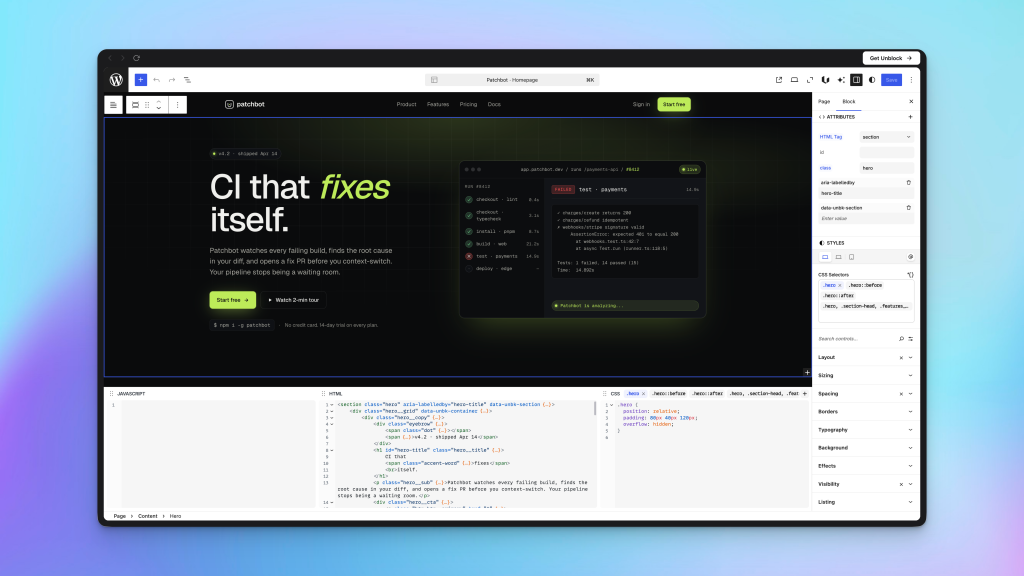
Unblock is a WordPress plugin that extends the native block editor (Gutenberg) by treating every block as a real HTML element — not an abstract content type. A Group block becomes a <div>. A Heading becomes an <h2>. An Anchor block becomes an <a>. What you build in the editor is exactly what ships to the browser.
This is a fundamentally different approach from page builders like Elementor, Divi, or even Bricks. Those tools generate HTML on your behalf. Unblock puts you in direct control of the HTML, CSS, attributes, and JavaScript — inside the familiar block editor interface you already use.
The plugin was created by Loïc Blascos, the developer behind WP Grid Builder, a well-regarded filtering and grid plugin in the WordPress community.
Why Unblock Exists: The Problem It Solves
The WordPress block editor has a fundamental limitation: it abstracts content into types. A button is a “Button block.” A link is an “Anchor block.” The editor decides what HTML it outputs, and your ability to customize it is limited to whatever controls the block exposes.
This creates three common workarounds, each with trade-offs:
Custom blocks — you write a React-based block plugin. This gives you full control, but requires ongoing development, maintenance across WordPress versions, and significant upfront effort for every component.
Multiple plugins — you install a page builder or block addon library. These add their own opinionated blocks, each with fixed styling options, proprietary markup, and often bloated output.
HTML blocks — you drop into raw HTML editing. This works, but requires unfiltered_html capability, breaks the visual editing flow, and doesn’t integrate with design tokens or dynamic data.
Unblock eliminates all three workarounds by giving you the output control of raw HTML, the visual editing experience of the block editor, and a full design system layer on top.
Core Architecture: One Block, One Element
The architecture of Unblock is stated in its name: un block (French for “one block”). Every block the plugin adds outputs exactly one HTML element. There is no wrapper soup, no injected classes you didn’t ask for, no hidden markup.
Every Unblock block can be configured with:
- Any HTML tag —
<header>,<nav>,<main>,<aside>,<footer>,<section>,<article>,<span>, and others - Any HTML attribute —
id,class,data-*,aria-*, custom attributes - Custom CSS — full CSS with selectors, pseudo-classes (
:hover,:focus,::before), media queries, container queries, and@keyframes - JavaScript interactions — add event-driven behavior to any block
- Dynamic data — expressions like
{{ post.title }}that pull live content from WordPress
This means a single Anchor block (<a>) with a nested SVG block (<svg>) gives you a fully custom icon button — with hover states, custom styling, accessible attributes — without a single additional plugin.
Design Tools: Real CSS, No Abstractions
Unblock includes a full design system accessible from the editor toolbar. The central hub is the design modal, which organizes your CSS into four panels:
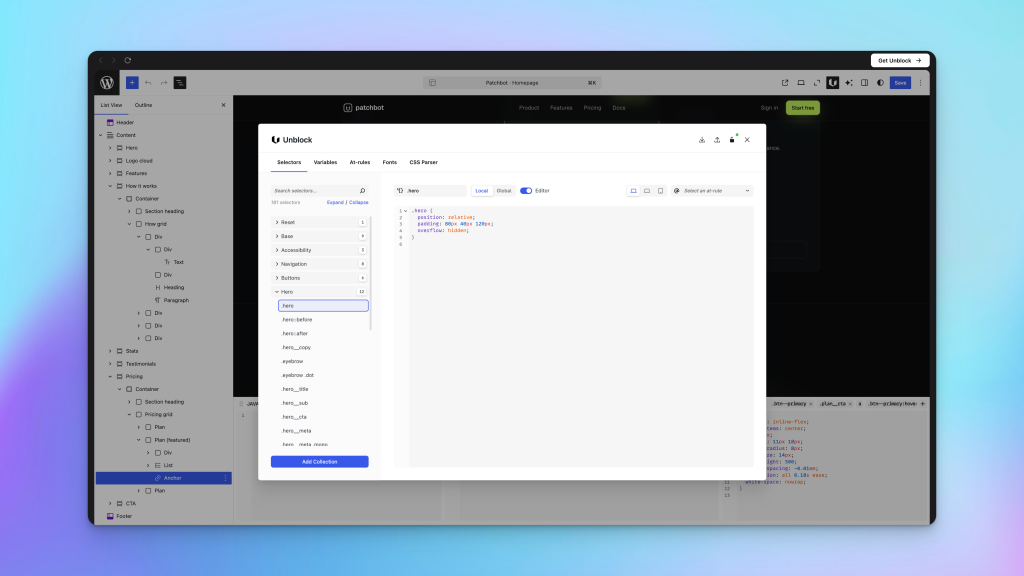
Selectors — create reusable CSS rules organized in collections. A selector can be a class, a compound selector, a pseudo-class, or any valid CSS rule. Assign a selector to any block. Rename it, and every block using it updates immediately.
Variables — define design tokens (colors, spacing, font sizes, etc.) as CSS custom properties. Type -- in any style field to autocomplete your variables. Change a variable value, and it propagates across every block using it.
At-Rules — set up media queries, container queries, @keyframes, and @layer rules. These apply globally or per-selector, giving you the same responsive and animation control you have in a traditional stylesheet.
Fonts — add Google Fonts or upload custom fonts. Choose weights and styles, and they are available immediately across your design tokens and selectors.
CSS Parser — paste in existing CSS and Unblock automatically generates selectors, variables, and at-rules from it. Useful for migrating from a stylesheet or importing a design system.
The styles panel (right sidebar) and the CSS inspector (bottom panel) are two-way synced: visual controls and raw CSS stay in sync at all times.
Performance
Unblock generates a single optimized, minified CSS file per page. Only the selectors, variables, and at-rules actually used on that page are included. Pages that don’t use any Unblock blocks carry zero overhead.
If the generated CSS is under 50 KB, it is inlined directly in the <head> to avoid a render-blocking request. Larger files are loaded as external stylesheets. The plugin is compatible with WP Rocket, W3 Total Cache, LiteSpeed Cache, and similar caching plugins.
Query Loops and Conditional Logic
Loop blocks let you iterate over any WordPress collection: posts, pages, custom post types, taxonomy terms, users, or attachments. You configure the query (number of items, post type, taxonomy filters, ordering, offset) and design the output once — the Loop block repeats it for each item.
Condition blocks show or hide content based on rules you define: whether the user is logged in, whether a post has a specific custom field, whether a term matches a value, whether a URL parameter is set. Conditions can be combined with AND/OR logic.
Both features work in the visual editor without writing PHP, making them the Unblock equivalent of what you would normally accomplish with a custom template in Timber or a custom block plugin.
AI Assistant (Unbot)
Unblock includes an AI assistant called Unbot, accessible directly in the block editor. It does not come with its own API key — you connect it to any supported AI provider via WordPress Connectors: OpenAI, Anthropic, Google (Gemini), or others.
Unbot has three specialized agents:
- Builder — creates and modifies blocks, builds page structure from a description
- Designer — handles visual styling: colors, spacing, typography, CSS variables
- Writer — writes and edits text content within blocks
The temperature settings adapt to each agent automatically (lower for Builder where precision matters, higher for Writer where variety helps). You can also drag images or PDFs into the chat to give the AI a reference — a design mockup, brand guidelines, or a layout to replicate.
For developers who prefer to write HTML and CSS manually, Unbot is an optional layer. For clients or less technical users working with the plugin, it provides a no-code interface on top of the full technical engine.
Forms
Unblock includes a native form system. Forms are built with blocks inside the editor, styled with the same selector/variable system as everything else, and integrated with your WordPress setup directly. No third-party form plugin required for basic to intermediate use cases.
How It Compares
vs. Bricks Builder or Oxygen — both of those are standalone page builders with their own rendering engines, template systems, and admin interfaces. Unblock works inside the native block editor. If you value Gutenberg’s editing experience, full-site editing, and ecosystem compatibility, Unblock keeps you there while adding the control those builders provide.
vs. Cwicly — Cwicly was another Gutenberg-based builder that took a similar approach (real HTML output, CSS control inside the editor). It was discontinued in early 2024 and later returned as a free, community-maintained project. Unblock is a commercial product under active development, which gives it a clearer sustainability path. The creator’s track record with WP Grid Builder signals a serious long-term commitment.
vs. Etch — Etch (EtchWP) is another emerging Gutenberg-native builder positioning itself for professional developers. Both are in early/beta phases. Unblock has published documentation, a functioning beta, and an AI assistant already integrated. Worth watching both.
vs. Raw Gutenberg — native Gutenberg gives you content blocks. Unblock gives you HTML elements with full attribute, CSS, and data-binding control. It extends the editor rather than replacing it.
Unblock is a WordPress plugin that extends the native block editor (Gutenberg) so every block maps directly to a real HTML element. You get full control over HTML tags, attributes, CSS, JavaScript, and dynamic data — all from inside the editor, without switching to a separate page builder interface.
Unbot is a chat assistant built into the block editor with three agents: Builder (creates and modifies blocks), Designer (handles CSS and visual styling), and Writer (writes and edits text content). It connects to your own AI provider (OpenAI, Anthropic, Google) via WordPress Connectors and does not include its own API key.
Unblock was created by Loïc Blascos, the developer known for WP Grid Builder, a popular WordPress filtering and grid layout plugin.
Unblock is currently in public beta. Check the official pricing page at unblockwp.com/pricing/ for current plans and lifetime license availability.